Start with who needs to be heard
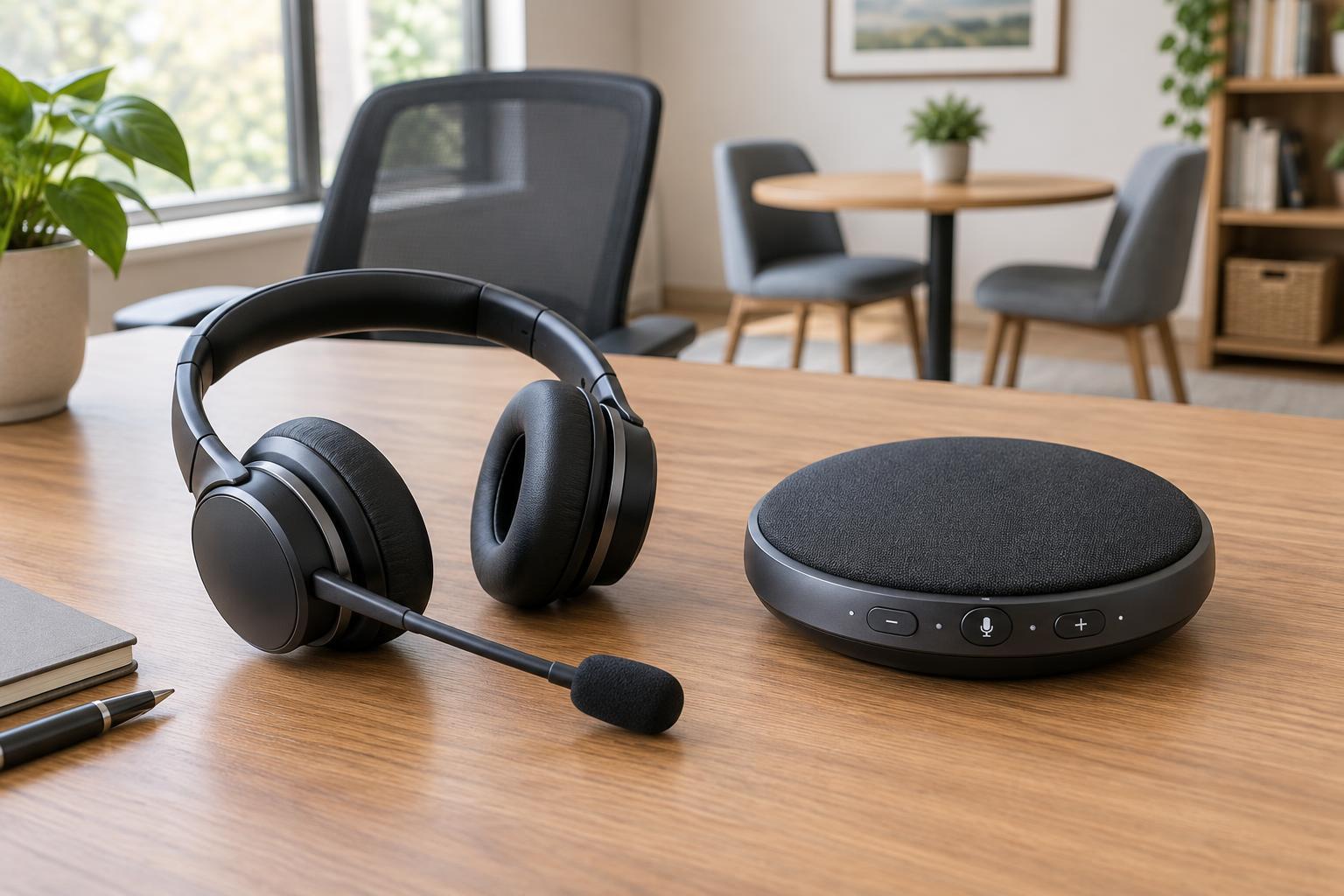
A headset and a conference speakerphone solve different call problems. A headset places a microphone near one person’s mouth and delivers sound through one or two earpieces. A conference speakerphone combines a loudspeaker and microphones so several people in a room can take part without passing a device around. The better choice depends less on the size of your desk than on how many people need to speak from that location.
For a solo worker, a headset is usually the simpler starting point. It gives the microphone a consistent position as the wearer turns toward a screen, takes notes or reaches for a document. If two or more coworkers regularly join the same call from one room, a conference speakerphone is more convenient: everyone can hear the remote participants and speak from their seats. If group calls are rare, separate headsets on separate computers may be sufficient, provided each person joins from a location where their microphone will not pick up the other devices’ audio.
Consider privacy and the room around you
A headset limits how much of the incoming conversation others nearby can hear, especially when both ears are covered. It does not make a call private by itself: the wearer’s voice remains audible in the room, and microphone pickup varies by design. Still, it can be a better fit for a shared workspace or a home office where someone else may be working nearby. A conference speakerphone makes both sides of the conversation audible in the room, so it belongs in a space where that is appropriate.
Room noise matters to both devices. A nearby headset microphone may capture less distant noise than a speakerphone placed in the middle of a table, though neither can reliably erase a barking dog, a printer running beside the desk or overlapping conversations. A speakerphone must pick up voices from different positions, so its performance depends more on seating distance, room acoustics and background sound. In a room with hard surfaces and noticeable echo, moving the device closer to the speakers or choosing a quieter space may help more than changing a software setting.
Compare comfort with participation
For long stretches of individual calling, look at headset fit as well as audio features. An adjustable headband, suitable ear cushions and a microphone boom that stays in place can matter more day to day than extra controls. A single-ear headset leaves one ear open to the room; a two-ear model may make incoming speech easier to focus on. Neither arrangement suits everyone, so comfort is worth checking before buying several identical units for a team.
A conference speakerphone avoids wearing equipment and can make a small in-room discussion feel more natural. People can see and address one another while including remote colleagues. Its trade-off is that participants must take turns clearly: when several people talk at once, the remote listener may have trouble following them. A useful group habit is to place the device centrally, keep papers and laptops from blocking it, and ask people at the far end of the table whether their voices are coming through clearly.
Check connections and controls before buying
Confirm how the device will connect to the computer or phone used for calls. Wired USB equipment can be straightforward at a fixed desk, but check the connector type and cable reach. Wireless equipment gives people more freedom to move, but adds charging and pairing to the routine. A standard audio plug may work for some headsets, yet microphone and headphone compatibility is not always obvious from the plug alone. If staff use multiple devices, verify that the model supports the connections and switching they need.
Useful controls include an easy-to-find mute button, clear mute status and accessible volume adjustment. For a headset, check whether the microphone can be positioned comfortably and whether the earpieces can be cleaned or replaced. For a conference speakerphone, check whether its intended room size and seating arrangement match yours; a device suited to a few people around a small table may not serve a long meeting room equally well. Compatibility with your calling application is also worth testing before relying on dedicated call-answer buttons.
Make the choice with a short trial call
Try each option in the setting where it will actually be used. Ask someone on the far end of a call whether your voice is clear when you sit normally, turn toward a second screen and type. For a group test, have each person speak from their usual seat rather than leaning toward the device. Listen for room echo, interruptions and changes in volume, then adjust placement before deciding that the equipment is at fault.
A practical small-office setup may use both: headsets for individual desks and a conference speakerphone for a shared meeting space. If the budget allows only one purchase, prioritize the calls you make most often. Choose a headset when one person usually speaks or nearby privacy matters. Choose a conference speakerphone when several people routinely gather around one table. Good placement, a quiet room and consistent mute habits will improve either choice.